There are many sites now which convert data into visual forms. This site called SHOW world displays a range of data in a visual form using the map of the world. Instead of land mass, the size of each country will represent the data for that subject. This can be the stimulus for class discussions or research activities.
Categories include:
People: Demographics, Causes of Death, Education, Health, Religion
Planet: Animal Resources, Crop Resources, Energy, Environment, Metals and Minerals, Natural Disasters
Business: Economy, Global Brands, Industry, Technology, Transport
Politics: Government, Law and Order, Migration, War & Conflict, Aid
Living: Food & Dining, Travel, Sports, Media
Tuesday, April 19, 2011
Monday, April 18, 2011
Online Comics and Graphic Novels
Here is a list of Online Graphic Novels and Comics. They vary from being read online or download as a pdf. With these comics you can use them for comprehension activities, use them as stimulus to give students ideas when they are making their own, you can also look at characters, setting and the plot of the comic.
The WormWorld Saga is an Online Comic and is available in a range of languages. This makes it a great tool for learning laguages.
DC Kids offers a range of comics which are free to download.
The Dream Chronicles is an online Graphic Novel.
This site offers a range of comics which are free to download. they are great for beginning readers andto use for visual literacy.
This site offers a range of online comics for early Phase students. They are also avaliable in English, French, Spanish, Russian and Chinese.
This site offers a range of Online Comics
This site provides free sample downloads of classics which have been converted into Graphic Novels such as Romeo and Juliet, Jane Eyre, A Christmas Carol and many more. The site also provides teacher resources and comics with no text so students can interpret the images and add their own text.
This site is a Forensic Science Mystery better suited for older students.
Free 'How to' downloadable comics
Free Download
Online Science Comics
Free Download comics on Biographies of the Twilight actors.
Free Download about internet safety
Online comic about internet safety
This link shows an adaptation of Hamlet created using a game similar to Machinima by Adrian Bruce.
This is a great resource to about Graphic Novels.
Wednesday, April 06, 2011
Online Comic Creators Glog
I have had another play with glogster and created this Virtual poster. Move your mouse over the words and click to go to the link.
Create Fun Interactives using Hyperlinks in PowerPoint
Many use hyperlinks to direct people to information such as websites by highlighting text. In PowerPoint you can add links to shapes by creating an invisible hyperlink.
This can be done by drawing a shape, selecting it and then finding the Action Button (2003 version will find it under Slideshow; later versions will find it under Insert). You then select which slide you want to link to the shape. Think of it as the first slide as the main page and the other slides are hidden behind it. This process adds more interactivity to PowerPoint and is a useful tool for Interactive White Boards.
There are many ways to use this process:
Create a Non-Linear slide: Create a Mindmap or picture and link the slides, rather than sequential
Create a Quiz or Game: You can create a quiz for students or they could make their own. Create a multiple choice and when the students select the correct answer they see a picture and sound.
Choose your own adventure: Add interest to story writing by asking students to write different alternatives to their story, the reader can choose the different options.
Create an Interactive Map: Take a screenshot of a map, add a shape and place it on the map. Link the shape to a slide with information about the place.
Create Flash cards: when learning words or another language. Make a box with a word and link it to a slide with a matching picture. Make a box with Japanese script and link it to the sound.
This process can really be adapted to suit any subject area
This can be done by drawing a shape, selecting it and then finding the Action Button (2003 version will find it under Slideshow; later versions will find it under Insert). You then select which slide you want to link to the shape. Think of it as the first slide as the main page and the other slides are hidden behind it. This process adds more interactivity to PowerPoint and is a useful tool for Interactive White Boards.
There are many ways to use this process:
Create a Non-Linear slide: Create a Mindmap or picture and link the slides, rather than sequential
Create a Quiz or Game: You can create a quiz for students or they could make their own. Create a multiple choice and when the students select the correct answer they see a picture and sound.
Choose your own adventure: Add interest to story writing by asking students to write different alternatives to their story, the reader can choose the different options.
Create an Interactive Map: Take a screenshot of a map, add a shape and place it on the map. Link the shape to a slide with information about the place.
Create Flash cards: when learning words or another language. Make a box with a word and link it to a slide with a matching picture. Make a box with Japanese script and link it to the sound.
This process can really be adapted to suit any subject area
Labels:
Elearn,
PowerPoint
Ideas for Stop Motion Animation
Creating Stop Motion Animation can be a great way for students to engage in learning content of any subject area. Stop Motion can be created in different ways. It can be divided into using 2D or 3D materials.
2D:
• Whiteboard and whiteboard marker
• Post it notes
• Cut outs, print our characters and make body parts moveable
• Foams letters or magnetic letters (Great for title sequence to add some interest)
• Roll out modelling clay and use cookie cutters
3D:
• Modelling clay (Make shapes or characters)
• Toys eg. Legos, action figures
• Objects eg. Stationery, cutlery, buttons, paddle pop sticks
• Create a set out of a box.
• Document change: Set the camera to take photos in intervals and document change eg. The sky, a plant growing etc.
Students have fabulous ideas and the best intentions, unfortunately their abilities can restrict the production of these ideas. Modelling clay characters can be difficult. I found these great people and bird add on pieces to push into clay. They make fabulous creatures without needing any modelling skills (and they are fun to make).
• With a whiteboard, create the illusion of writing your name with your finger.
• Make a piece of paper fold up and then unfold by itself. (Done by reversing slides)
• Make buttons follow each other in a line
Here are some ideas for animations:
• Convert a fairytale, fable or nursery rhyme.
• Adapt a movie story line
• Create a Music Film clip
• Convey a message ‘Save the Environment'
• Re-write history
• Create characters from a novel students are reading
Here are a few You Tube videos I like to show students to give provide inspiration:
The Animals Save the Planet - Energy Efficient Penguin
(There are many others in this series)
Clay Play
There was a Time
Deadline - Post it Stop Motion
Ping Pong Ball Stop Motion
Legos-Grease
2D:
• Whiteboard and whiteboard marker
• Post it notes
• Cut outs, print our characters and make body parts moveable
• Foams letters or magnetic letters (Great for title sequence to add some interest)
• Roll out modelling clay and use cookie cutters
3D:
• Modelling clay (Make shapes or characters)
• Toys eg. Legos, action figures
• Objects eg. Stationery, cutlery, buttons, paddle pop sticks
• Create a set out of a box.
• Document change: Set the camera to take photos in intervals and document change eg. The sky, a plant growing etc.
Students have fabulous ideas and the best intentions, unfortunately their abilities can restrict the production of these ideas. Modelling clay characters can be difficult. I found these great people and bird add on pieces to push into clay. They make fabulous creatures without needing any modelling skills (and they are fun to make).
Here are some scaffolding activities I use as an introduction to build confidence:
• With a whiteboard, create the illusion of writing your name with your finger.
• Make a piece of paper fold up and then unfold by itself. (Done by reversing slides)
• Make buttons follow each other in a line
Here are some ideas for animations:
• Convert a fairytale, fable or nursery rhyme.
• Adapt a movie story line
• Create a Music Film clip
• Convey a message ‘Save the Environment'
• Re-write history
• Create characters from a novel students are reading
Here are a few You Tube videos I like to show students to give provide inspiration:
The Animals Save the Planet - Energy Efficient Penguin
(There are many others in this series)
Clay Play
There was a Time
Deadline - Post it Stop Motion
Ping Pong Ball Stop Motion
Legos-Grease
Labels:
Animation,
digital storytelling
Wimp Yourself - Avatar Maker
Here is another fun avatar maker where students can create their own characters which they can then make a story or add them into a comic.
Labels:
Art,
Avatarmakers,
Comics
Using Powerpoint to Remove Backgrounds
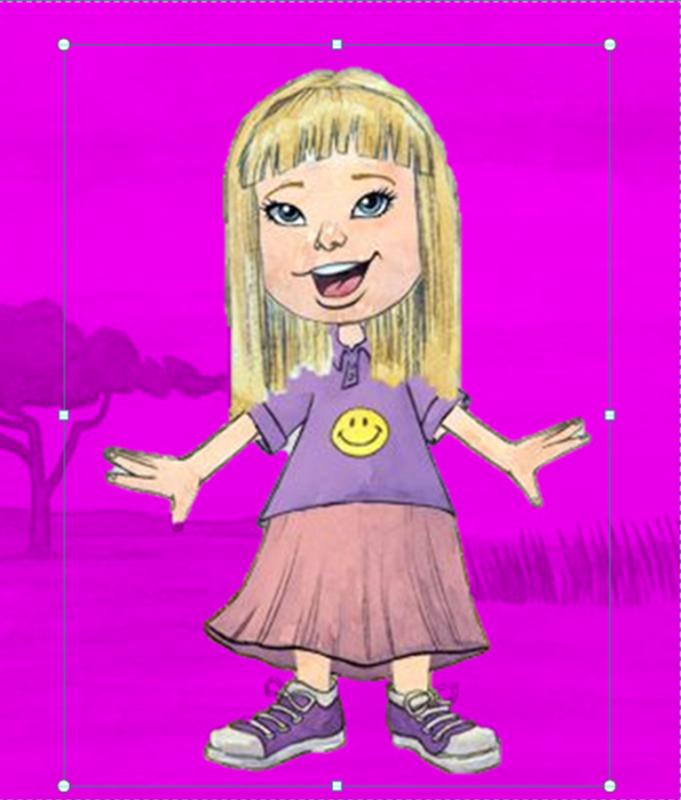
I love Powerpoint (yes you heard right). Once you start playing with the page dimensions it is amazing what you can come up with. I use it mainly now for designing and making comics rather than presentations. One great feature with I love on the 2010 PowerPoint is the Remove Background option. When you insert an image and select Picture Tools you will see this tool bar.
Select Remove Background. The background will appear purple. Just move the selected area until the image you want to keep has no purple on it.
When you are happy with your selection, click on Keep Changes and …..
By cropping an image or yourself out of a photo it allows you to create some great learning activities which can apply to a range of contexts such as,- Paste face on to animals, creatures or avatars
- Go on a Virtual field trip: place yourself into images from around the world
- Time travel: place yourself into images from history
- Personalise a story: students can place themselves into a story
- Experiment with scale: make an object look larger or smaller than real life by placing it next to another object. Here is an example from http://www.worth1000.com/
Labels:
Photography,
Photoimaging,
PowerPoint
Subscribe to:
Posts (Atom)