Showing posts with label Animation. Show all posts

Saturday, June 18, 2011

Creating Digital Multimodal Texts


With the introduction of the Australian Curriculum, there is an emphasis on the use of Multimodal Text in English. ICT offers a great range of tools to allow students to create digital multimodal texts, such as comics, animations, digital storytelling, video & audio, ebooks, poster & cover design and game design .


What are multimodal texts?

A text may be defined as multimodal when it combines two or more semiotic systems. There are five semiotic systems in total:

1. Linguistic: comprising aspects such as vocabulary, generic structure and the grammar of oral and written language

2. Visual: comprising aspects such as colour, vectors and viewpoint in still and moving images

3. Audio: comprising aspects such as volume, pitch and rhythm of music and sound effects

4. Gestural: comprising aspects such as movement, speed and stillness in facial expression and body language

5. Spatial: comprising aspects such as proximity, direction, position of layout and organisation of objects in space.

Multimodal texts can be delivered via different media or technologies. They may be live, paper, or digital.

(Bull and Anstey, 2010)


Photostory 3, Windows Movie Maker, Audacity, Soungle, Free Sound Project


Use software usch as powerpoint, publisher, paint.net or photoshop


Tag Cloud: Wordle, Tagxedo


Anstey, M. & Bull, G. (2010) Helping teachers to explore multimodal texts. Curriculum Leadership, 8 (16)


Thursday, May 19, 2011

Using Animations to Apply Knowledge

Creating animations is a great way for students to apply their knowledge and demonstrate understanding. It also allows students to develop problem solving and decision making skills while being creative and having fun.  I have included a few links to sites to give ideas and a table to show how animations can be used across subject areas.


I Create to Educate

Great student sample I particularly like to animated diagram of the heart.


Sam Animation


Klutz: great ideas for stop motion animation


Animate Clay


RollerMache


Animation for education


Using Animations Across Subject Areas

English

  • Demonstrate knowledge of the genre and audience

  • Create a Book trailer as an alternative to a book report

  • Interpret myths and legends

  • Interpret a poem or nursery rhyme through animation

  • Create a persuasive animation by focusing on environmental issues

  • Bring characters from a novel or play to life by adding them to an animation

  • Write a story and adapt to an animation

  • Using foam letters to spell words

  • Using magnetic words to create sentences

  • Use new vocabulary words in context

  • Create an advertisement

Maths

  • Demonstrate understanding of fractions and percentages

  • Display number equations

  • Create shapes

  • Demonstrate understanding of percentages

  • Demonstrate understanding of time

  • Create animated graphs

  • Use lego blocks for counting

Science

  • Demonstrate phases of the moon

  • Life Cycles

  • Solids, liquids and gases

  • Forms of energy

  • create a sun safe animation

  • Growth of a plant

  • Circulatory system

  • Digestive system

  • Demonstrate a volcanic eruption or earthquake

  • Time-lapse video of plant growing, weather changing and melting

  • Show understanding of laws of physics

  • Show the position and movement of planets in our solar system

  • Demonstrate understanding of magnets

SOSE

  • Indigenous dreamtime stories

  • Re-enact events in history

  • Environmental sustainability

  • Travel around a map

  • Natural Disasters

  • Languages Stroke order of script writing

  • Characters speaking in the target language

  • Create an animation depicting a culture

Art

  • Demonstrate colour theory

  • Bring an art work to life

  • Demonstrate understanding of the elements and principle of design

  • Document the creation of an artwork from beginning to end

  • Create animation exploring art movements e.g. Surrealism

Music

  • Create music tracks for animations

  • Demonstrate how to write music

  • Demonstrate music theory

Home Economics

  • Demonstrate procedures and safety

  • Create the illusion that a meal made itself by taking images during the preparing and cooking process.

  • Nutrition


Wednesday, April 06, 2011

Ideas for Stop Motion Animation

Creating Stop Motion Animation can be a great way for students to engage in learning content of any subject area. Stop Motion can be created in different ways. It can be divided into using 2D or 3D materials.


2D:

• Whiteboard and whiteboard marker

• Post it notes

• Cut outs, print our characters and make body parts moveable

• Foams letters or magnetic letters (Great for title sequence to add some interest)

• Roll out modelling clay and use cookie cutters


3D:

• Modelling clay (Make shapes or characters)

• Toys eg. Legos, action figures

• Objects eg. Stationery, cutlery, buttons, paddle pop sticks

• Create a set out of a box.

• Document change: Set the camera to take photos in intervals and document change eg. The sky, a plant growing etc.


Students have fabulous ideas and the best intentions, unfortunately their abilities can restrict the production of these ideas. Modelling clay characters can be difficult. I found these great people and bird add on pieces to push into clay. They make fabulous creatures without needing any modelling skills (and they are fun to make).


Here are some scaffolding activities I use as an introduction to build confidence:


• With a whiteboard, create the illusion of writing your name with your finger.

• Make a piece of paper fold up and then unfold by itself. (Done by reversing slides)

• Make buttons follow each other in a line


Here are some ideas for animations:

• Convert a fairytale, fable or nursery rhyme.

• Adapt a movie story line

• Create a Music Film clip

• Convey a message ‘Save the Environment'

• Re-write history

• Create characters from a novel students are reading

Here are a few You Tube videos I like to show students to give provide inspiration:


The Animals Save the Planet - Energy Efficient Penguin

(There are many others in this series)

Clay Play

There was a Time

Deadline - Post it Stop Motion

Ping Pong Ball Stop Motion

Legos-Grease

Thursday, April 15, 2010

Xtranormal

I have been creating resources for teachers to show how to use different sites.  This is a fun one to use called www.xtranormal.com/ .  I have been having a play, so I thought I would share.

Tuesday, April 06, 2010

Online Animation Creators

Saturday, July 04, 2009

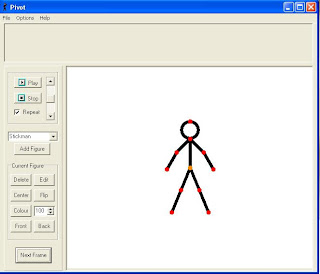
Pivot Stick Figure Animator

Pivot Stickfigure Animator is a fun and easy way to produce an animation. You could use it as a task, introduction into animation, telling a story or to develop design and ICT skills. This is a great program that is free to download.


You can create an animation using a stickfigure or other characters. It can be as simple and as complex as you want it. It can be used from primary school students through to high school.


First I ask students to design a background using a drawing software, usually MSPaint (but any will do). It helps the creation of the animation if the background contains elements which the figures can interact with. eg. Hurdles to jump, diving board. It is also possible to use digital images as backgrounds.


The animation is quite simple to make, simply move the figure using the red points and then click on next frame button. Continue until the animation is finished. There is also the option to add items into the animation which can also move. eg. a ball. The final animation can be saved it as a Gif file. This can then be downloaded into Windows Movie Maker and students can add a title, credits and music or add it to a power point presentation.


I like to choose a theme and make certain specifications, such as, no violence and no one can get hurt.


I found ‘Olympic Sports’ was a great theme to use giving students many ideas to choose from.
You can download the program from http://www.snapfiles.com/GeT/sTiCkFiGuRe.html