Tuesday, July 21, 2009

My Culture Quest


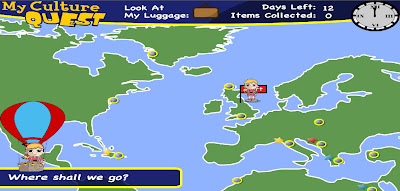
My Culture Quest is a fun, interactive site which explores different cultures and countries. You choose a character and then start travelling the world visiting museums and galleries. Each place visited offers information about an artwork or cultural item. Students need to read the information and then answer a multiple choice question correctly in order to collect the item and create their own exhibition.


Once in the game, a world map is provided with highlighted points. Click on the point to travel to the destination. Your character will travel via air balloon.


You are given 12 days to collect as many items as you can. You probably won’t get all the items in this time allowing students to play the game several times without being bored as they explore new places.


One drawback however, there is no point to visit in Australia!


This site provides a great way for students to learn about art, history, countries, cultures, religion and maps. It also encourages the development of comprehension and reading skills. The site allows you to download flash cards with quiz questions to help students remember the information. These cards could also be used for further activities.

Students could do the following activities:
· find the countries using google maps
· find famous landmarks from the country
· research the flag
· write a travel journal of their journeys and document the items they collect.
· make a passport documenting places of their travels
· research countries visited
· research art items and art techniques mentioned.
· make a quiz or board game based on collecting items as you answer questions correctly.

Online Comic Creators

3 Fun Games to use in the Classroom

Tap into the world of comics

Online Tools to Research, Organise and Process Information

Build Your Wild Self


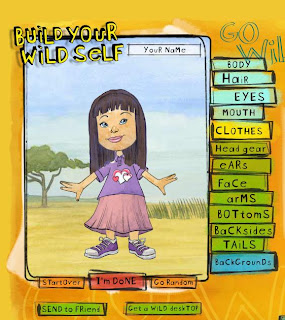
Build Your Wild Self is a fun and creative site where you can create a character by choosing human parts and then combine them with animal parts. The site provides lovely hand drawn and watercoloured images. Simply click on the body part you want to create and choose the image you want. There are also options to change colours. There are limited options for clothes though.


Once finished creating, you can print out the design or email it to a friend or yourself. It is sent as a .gif file allowing you to save it.

This site could be used in many ways across different year levels. Students could make an image of themselves first without any body parts and then add their favourite animal parts. The printed image even comes with a name made up from all the animals. Students could describe the image or create a story about the character.

Each member of the class could make a character and print it out to put up around the room. This site could be used with any animal unit.

It could be used as a starting point for an artwork and is also useful for creating an avatar.

Here is an example of a character without animal parts.


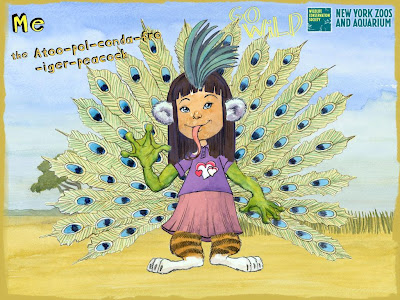
Here is an example after animal parts are added.


Friday, July 10, 2009

Tools to use at the beginning of a school year


It is important for a teacher to know their students in order to best cater to their strengths and needs and to provide a positive learning environment. This can be done by using digital tools such as:

1. Talking Avatars


Students can introduce themselves using a talking avatar. You might set out specific questions you would like answered in this task.


2. Visual Communication


Using avatar design sites, students create an avatar which resembles them and contains visual images which represents something about them. Eg. Holding a guitar – likes music.


· Students could write about their avatar and explain the meaning of the visual images
· Set up a guessing game and see if the class can guess who is who.
· Print out the avatars and distribute them and ask students to find the person who belongs to the avatar and interview them - ice breaking exercise.
· Display the avatar images around the room


Sites to use are:


Using the wordle site, produce a word cloud made up of words which represents them. Go to this link for more information.


Produce a ‘About Me’ world in the Shidonni site. Go to this link to see more.


5. Personal Profile


Students can produce a personal profile using an eportfolio which is password protected.


Create a personal profile using a presentation or virtual book.


Wobook

6. Time Line


Students can create a virtual time line of their life documenting events with text and images.


Dipity

7. Online Survey


Identify prior knowledge and interest by creating an online survey for your students.


Questionform


8. Determine students’ strengths and learning styles

It is important to know your students' strengths and weaknesses. It is also important that students know their own strengths and weaknesses. The following a tests which evaluate these.