This site allows you to create Trading Cards which gives students an alternative way to demonstrate their knowledge of a concept. This interactive activity allows students to create their own trading card about a real or fictional person, place, object, event or concept. The site also provides ideas and lesson plans.
Saturday, August 24, 2013
Turn photos into art with these 3 apps
Popsicolor is a great photo editing app from the creator of Percolator. It turns your photos into an ink drawing using two colours. It is easy and fun to use. You can load images from your photo gallery on your device or take a photo.
This is another photo editing app which allows you to be creative with both images and videos. You can select from a range of tools to create artistic effects.
Repix provides you with a range of artistic effects which you apply straight to the image by drawing on the iPad. This gives you freedom to add effects where you want.
Labels:
Apps,
Digitalphotography,
Photography
Monday, June 17, 2013
Sunday, May 05, 2013
Having fun with spelling
Here are two sites which can add variety and interest to spelling activities!
Create words using
images from Flickr. Great for writing names or adding interest to
spelling words or creating banners to decorate Virtual Classrooms. Type in the
word and click on spell. To change the
look of a letter click on it. To save
the image use can use the snipping tool on your lap top.
This is a great way
to add some interest to spelling and integrate geography at the same time. You
can type a message and the site finds an image from around the globe which
resembles the letter. You could do this
as a class activity or send a message to someone.
7 Great sites for free images
There are many reasons why we use images in the
classroom. With the internet, we now
have access to more images than we have before.
However, we need to be aware of which images we use and the copyright
restrictions.
Here are a few sites which provide free images to use. You still need to check the requirements
before you use the image.
Labels:
images
Saturday, March 24, 2012
Creating Comics with Photoscape
Photoscape is a free software which you can download. This software has many uses but the one which I really like is the ability to create photo collages and add speech bubbles.
It would be interesting to hear how others would use this software. It is great for creating Digital Storytelling, comics, digital multimodal products and collages.
To create a comic click on 'Page'.
You can then select the size of the page and select the page template you wish.
Change the size by clicking on Edit, an A4 size is Width: 720 and Height 1040
You select the folder with images and click and drag the images into the collage.
To add the speech bubble, click on edit and then object. Customise the speech bubble.
You can then save the page as a jpeg file to your computer.
Creating Photo Collages can also be a great way to tell a story by choosing a theme or take photos of the same object from different angles. I would love to hear ways you would you this software.
Labels:
Comics,
digital storytelling,
Photography
Wednesday, November 09, 2011
Embed into PowerPoint
I had to share this bit of information. Yesterday a colleague of mine showed me how you can embed items into 2010 powerpoint.
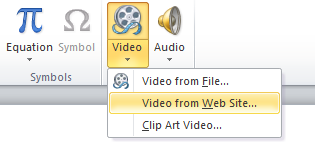
Go to insert, video and video from website
Copy the embed code from a website such as http://www.voki.com/
Select Insert and the embeded content will now appear in the PowerPoint.
For years Language teachers have been asking me how they can save their Vokis without having students sign in. This is a great way for students to present work from the web.
Vokis in particular can be used for students to demonstrate understanding, reflecting, learning words and greetings, asking questions, responding and give instructions.
Go to insert, video and video from website
Copy the embed code from a website such as http://www.voki.com/
Paste in the Code
Select Insert and the embeded content will now appear in the PowerPoint.
For years Language teachers have been asking me how they can save their Vokis without having students sign in. This is a great way for students to present work from the web.
Vokis in particular can be used for students to demonstrate understanding, reflecting, learning words and greetings, asking questions, responding and give instructions.
Labels:
avatars powerpoint
Subscribe to:
Posts (Atom)