- Make own avatar and use in a personal profile listing hobbies, interest and goals.
- Make own avatar with background and accessories which represent their interests. The students can explain what the visual images represent, eg. A guitar because they love to listen to music.
- Students divide into pairs and make avatars of each other.
- Make own avatars, print them out and collect them. Shuffle and distribute them. Students then find the person who corresponds with their avatar. (Great ice breaker activity)
- Print out avatars with the student’s name underneath and use them to decorate and personalize the classroom.
- Make avatars of characters from a book, film or play the class is looking at.
- Make avatars and write a story about them.
- Design an avatar and convert the image into an artwork. It could be used in a screen printing activity, painting or drawing.
- Use as a character in a game or animation such as flash or scratch.
- Print out the character and pin the joints to make it movable. This could be used as a puppet or could be brought to life in a stop motion animation.
- Make a 3-D interpretation of the character in clay or construction materials
- or just to have some FUN!
Face Your Manga
Representation: head and shoulders
Design Options: some choices
How to save image:do a screen capture or email it to yourself by adding a nickname, year of birth, country and email address. The image is then sent in jpeg form.
Age Group Suitability: This site would be more suited for older students in high school due to some of the images available.
 Portrait Avatar Maker
Representation: full body
Design Options: many choices
How to save image: Click on Alignment and choose the file type you prefer. Click on the final design and then save to file. No registration needed.
Age Group Suitability: suitable for any age

Portrait Illustration Maker
Representation: head and shoulders
Design Options: many choices
How to save image: Click on Alignment and choose the file type you prefer. Click on the final design and then save to file. No registration needed.
Age Group Suitability: older students, some images may not be appropriate
 Portrait Icon Maker
Representation: sitting at a desk
Design Options: many choices
How to save image: Click on Alignment and choose the file type you prefer. Click on the final design and then save to file. No registration needed.
Age Group Suitability: older students

TizMe
Representation: full body
Design Options: many choices
How to save image: do a screen capture or register.
Age Group Suitability: older students mainly due to clothing options.

Bless This Chick
Representation: full body
Design Options: many choices, makes females only
How to save image: screen capture or email it to yourself.
Age Group Suitability: all ages
 WeeWorld
Representation: full body
Design Options: a great variety and includes accessories to show interest and hobbies.
How to save image: Click on a WeeMee, screen capture or register.
Age Group Suitability: all ages
 Create a Simpsons Avatar
Representation: full body
Design Options: a great variety and includes accessories to show interest and hobbies.
How to save image: To start click on Create your Simpsons Avatar and then choose New character. To save you can download a jpeg version, email it or print.
Age Group Suitability: Probably more suitable for upper primary and secondary.
 Simpsonize Me
Representation: full body or head and shoulders
Design Options: requires you to upload an image
How to save image: Email or export
Age Group Suitability: Probably more suitable for upper primary and secondary.
 Anime Face Maker
Representation: head and shoulders
Design Options: good design choices
How to save image: screen capture
Age Group Suitability: all ages
 South Park Studio
Representation: Full body – based on the South Park Animations
Design Options: good design choices
How to save image: screen capture
Age Group Suitability: Probably best for upper Secondary.
 Avatar Maker
Representation: Head
Design Options: a few choices
How to save image: screen capture or email
Age Group Suitability: upper primary and secondary

Mess Dudes!
Representation: Full Body
Design Options: a few choices
How to save image: screen capture is the easiest
Age Group Suitability: upper primary and secondary

My Avatar Editor
Representation: Full Body
Design Options: a few choices
How to save image: Export and save as jpeg or png
Age Group Suitability: all ages

Doppel Me
Representation: Full Body
Design Options: a few choices, more if you register
How to save image: Screen Capture or register
Age Group Suitability: Upper primary and secondary

Why Robbie rocks
Representation: Full Body
Design Options: a good range of choices
How to save image: Click on next to look at different categories. To save use Screen Capture or register
Age Group Suitability: secondary students

Windows Live Minimize Me
Representation: Head, emoticon
Design Options: limited choices
How to save image: To save use Screen Capture or save to file
Age Group Suitability: any age

Elouai Doll makers
Representation: Full Body
Design Options: There are many options and categories one includes Harry Potter characters
How to save image: save to file as a gif file
Age Group Suitability: any age

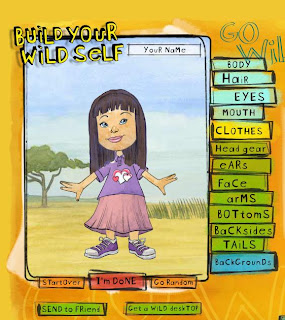
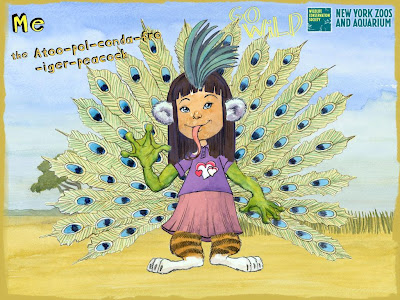
Build Your Wildself
Representation: Full Body
Design Options: a few options including animal parts
How to save image: screen capture or email it as a gif file
Age Group Suitability: Primary school students

Mini Ego
Representation: Full body
Design Options: a small range
How to save image: Screen Capture or register
Age Group Suitability:all ages
 Muggins
Representation: Full Body
Design Options: There are many options and colour changes
How to save image: screen capture
Age Group Suitability: any age

Wirefly
Representation: Head and shoulders
Design Options: a few choices, realistic.
How to save image: animated avatars for download to phones or use as 2D with a screen capture
Age Group Suitability: secondary students

Voki
Representation: Head and shoulders
Design Options: a few choices, animated avatars and you can add text which convert to speech
How to save image: email final design, embed into a blog or website or do a screen capture.
Age Group Suitability: secondary students

Dream Avatar
Representation: Full body
Design Options: a large range
How to save image: Screen Capture or embed in blog or websites
Age Group Suitability: upper primary and secondary

Anime Character Maker
Representation: Half Body
Options: a good range
How to save image: Screen Capture
Age Group Suitability: upper primary and secondary

Lunaii Doll Maker
Representation: Head and shoulders
Options: a good range
How to save: Screen capture
Age Suitability: upper primary and secondary